未分类
2020-10-29 10:16:12
1822677238@qq.com
手机扫码查看
2020javaweb教程之JSP应用
EL表达式
目的:简化jsp中java代码开发,代替脚本表达式<%=username%>
它不是一种开发语言,而是jsp中获取数据的一种规范
格式:${username} 等价于 pageContext.findAttribute(name)
获取简单参数
<%
    pageContext.setAttribute("username","admin");
    request.setAttribute("password","admin888");
    session.setAttribute("mobile","133");
    application.setAttribute("sex","男");
%>
<%-- java脚本表达式--%>
<%=request.getAttribute("password")%> <br>
<%-- EL表达式 --%>
${password} <br>
<%-- 不知道存 哪个作用域  想拿application作用域 --%>
${applicationScope.sex}
获取实体类对象中的属性值
<%
    Users users=new Users();
    users.setUsername("admin");
    request.setAttribute("users",users);
%>
${users.username}
使用List和Map集合
<%
    List<String> list=new ArrayList<String>();
    list.add("A");
    list.add("B");
    list.add("C");
    list.add("D");
    request.setAttribute("list",list);
%>
${list.get(0)} ${list[2]} <br>

<%
    Map<String,String> map=new HashMap<String,String>();
    map.put("SH","上海");
    map.put("TJ","天津");
    map.put("GZ","贵州");
    request.setAttribute("map",map);
%>
${map.get("GZ")} <br>
${map.GZ} <br>
${map["TJ"]} <br>
<%-- 获取集合里所有的值 --%>
${map.values()} <br>
<%-- 获取集合里所有的键 --%>
${map.keySet()}
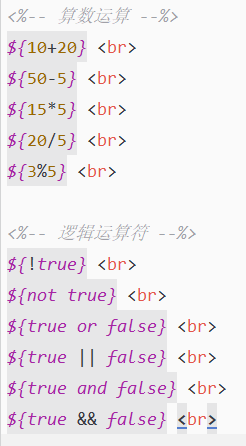
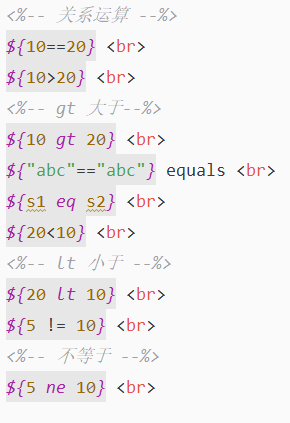
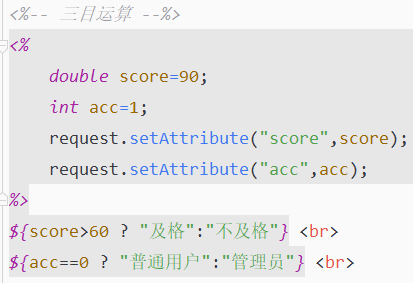
使用EL表达式执行运算
empty关键字
empty关键只要内容是空true
<%
    String s=null;
    String ss="";
    String sss=" ";
%>
${empty s}<br>
${empty ss} <br>
${empty sss} <br>
11个隐式对象
JSP 表达式语言定义了一组隐式对象,其中许多对象在 JSP scriplet 和表达式中可用:
pageContext:页面上下文,可以获取jsp中其他八个内置对象
pageScope、requestScope、sessionScope、applicationScope表示四个域对象中集合
param 表示request.getParameter(“username”); ${param.username}
paramvalues 表示request.getPrameterValues(“hobby”); ${paramValues.hobby}
header 表示 request.getHeader(“accept”); ${header.accept};
headerValues 表示 request.getHeaderValues(“accept-encoding”); ${headerValues”accept-encoding”}
cookie 表示 request.getCookies(); ${cookie.JSESSIONID}
initParam 表示 ServletContext(application)初始化参数
<%
    String username = request.getParameter("username");
%>
${param.username} <br>
${paramValues.hobby[0]} <br> <!-- 获取多选框的值 -->
${header.Accept} <!-- 跳转过来请求的头部信息有哪些内容 -->
${headerValues["accept-encoding"][0]} <br>
${cookie.JSESSIONID} <br>
${initParam.username}
- 本页地址 https://www.9713job.com/?p=2439
- 上一篇 <<2020javaweb教程之JSP
- 下一篇 >>2020javaweb教程:jsp之JSTL





发表回复