未分类
2020-12-12 16:13:25
1822677238@qq.com
手机扫码查看
2020java框架教程之spring处理模型数据
1.使用entity将数据从页面传递到 controller
绑定参数
entity:
User:
String username,String password,Integer age,String email,Address address
Address:
String addr,String zipCode
JSP:
<form action="add" method="post">
    <label for="username">
        username : <input type="text" id="username" name="username"><br>
    </label>
    <label for="password">
        password : <input type="password" name="password" id="password"><br>
    </label>
    <label for="age">
        age : <input type="text" name="age" id="age"><br>
    </label>
    <label for="email">
        email : <input type="email" name="email" id="email"><br>
    </label>
    <label for="address.addr">
        addr : <input type="text" name="address.addr" id="address.addr"><br>
    </label>
    <label for="address.zipCode">
        zipCode : <input type="text" name="address.zipCode" id="address.zipCode"><br>
    </label>
    <button>submit</button>
</form>
controller:
@RequestMapping("/user")
@Controller
public class UserController {
    @RequestMapping("/form")
    public String testUser(){
        return "form";
    }
    @RequestMapping("/add")
    public String add(User user){
        System.out.println(user);
        return "success";
    }
}
2.ModelAndView
@RequestMapping("/edit")
public ModelAndView edit(){
    User u=new User("张三","123",12,"12@qq.com",new Address("ah","123"));
    ModelAndView mav=new ModelAndView("form");
    mav.addObject("user",u);
    return mav;
}
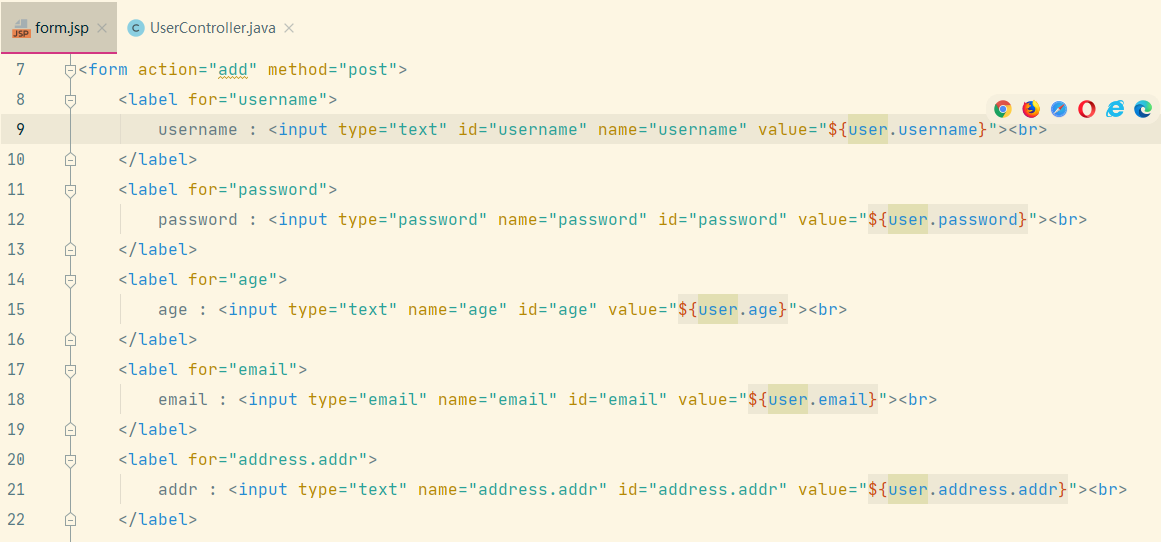
然后在表单的value值用表达式填入
3.Map
@RequestMapping("/edit1")
public String edit1(Map<String,Object> map){
    User u=new User("张三1","123",12,"12@qq.com",new Address("ah","123"));
    map.put("user",u);
    return "form";
}
4.Model
@RequestMapping("/edit2")
public String edit2(Model model){
    User u=new User("张三2","123",12,"12@qq.com",new Address("ah","123"));
    model.addAttribute("user",u);
    return "form";
}
5.sessionScope
@SessionAttributes(value = {"user"},types = {String.class})
//只将String类型参数保存在session作用域,其他类型不保存
public class UserController {
@RequestMapping("/edit1")
public String edit1(Map<String,Object> map){
    map.put("strvalue","strvalues");
    map.put("intvalue",123);
    return "form";
}
}





发表回复